Begin With Unity for Beginners1.0
Publisher Description
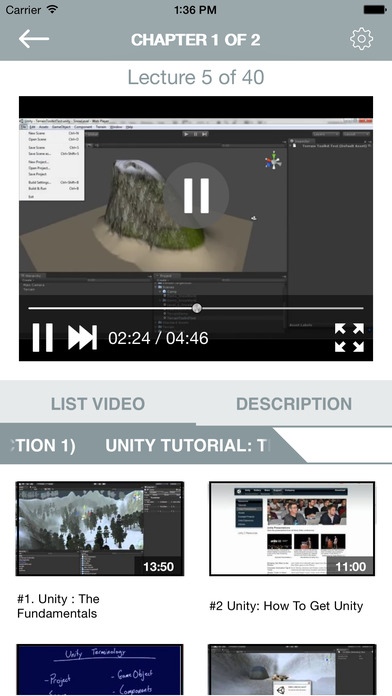
Lecture 01. #1. Unity : The Fundamentals
Lecture 02. #2 Unity: How To Get Unity
Lecture 03. Unity Terminology Part 1 : Intro
Lecture 04. Unity Terminology Part 2 : Projects
Lecture 05. Unity Terminology Part 3 : Scenes
Lecture 06. Unity Terminology Part 4 : Packages
Lecture 07. Unity Terminology Part 4 : Packages
Lecture 08. Unity Terminology Part 5 : Prefabs
Lecture 09. Unity Terminology Part 6: Game Objects
Lecture 10. Unity Terminology Part 7: Components
Lecture 11. Unity Terminology Part 8: Assets
Lecture 12. Unity Terminology Part 9: Scripts
Lecture 13. 1. Unity : Our First Level Intro
Lecture 14. 2 Unity: Project Creation
Lecture 15. 3. Unity: Initial Terrain Setup
Lecture 16. 4 Unity: Saving the Scene
Lecture 17. 5 Unity : Terrain Toolkit
Lecture 18. 6 Unity : Terrain Sculpting
Lecture 19. 7 Unity : Play Testing
Lecture 20. 8 Unity: Testing and Adjusting
Lecture 21. 9 Unity : Adding Terrain Assets
Lecture 22. 10 Unity: Procedural Texturing
Lecture 23. 11. Unity: Texture Painting
Lecture 24. 12 Unity: Adding Trees
Lecture 25. 13 Unity: Adding Details
Lecture 26. 14 Unity: Adding Skyboxes
Lecture 27. 15 Unity: Sun And Lens Flare
Lecture 28. 16 Unity: External Assets ( Maya)
Lecture 29. 17 Unity: Importing FBX Files
Lecture 30. 18 Unity: Collision Objects
Lecture 31. 19 Unity: Water
Lecture 32. 20 Unity: Snow Effect
Lecture 33. 21 Unity: Fog and Ambient LIght
Lecture 34. 22 Unity : Adding Steam Effect
Lecture 35. 23 Unity: Adding Campfire Effect
Lecture 36. 24 Unity: Campfire Sound
Lecture 37. 25 Unity : Wind Sound
Lecture 38. 26 Unity: Wind Zone
Lecture 39. 27 Unity: Light Mapping
Lecture 40. 28 Unity: Build and Wrapup
Lecture 41. Interface At a Glance
Lecture 42. Scene View vs. Game View
Lecture 43. Maya Style Viewport Navigation
Lecture 44. FPS Style Viewport Navigation
Lecture 45. Scene Gizmo
Lecture 46. Draw Modes
Lecture 47. Render Modes
Lecture 48. Viewport Functions
Lecture 49. Game Aspect
Lecture 50. Game View Toolbar
Lecture 51. MainMenubar- File
Lecture 52. MainMenubar- Edit
Lecture 53. Main Menubar- Assets
Lecture 54. MainMenubar- GameObject
Lecture 55. Main Menubar- Components
Lecture 56. Main Menubar- Terrain
Lecture 57. Main Menubar- Window
Lecture 58. MainMenubar- Help
Lecture 59. Toolbar- TransformTools
Lecture 60. Toolbar- Pivot Local/Global
Requires iOS 8.0 or later. Compatible with iPhone, iPad, and iPod touch.
About Begin With Unity for Beginners
The company that develops Begin With Unity for Beginners is Nga Le. The latest version released by its developer is 1.0.
To install Begin With Unity for Beginners on your iOS device, just click the green Continue To App button above to start the installation process. The app is listed on our website since 2015-11-13 and was downloaded 24 times. We have already checked if the download link is safe, however for your own protection we recommend that you scan the downloaded app with your antivirus. Your antivirus may detect the Begin With Unity for Beginners as malware if the download link is broken.
How to install Begin With Unity for Beginners on your iOS device:
- Click on the Continue To App button on our website. This will redirect you to the App Store.
- Once the Begin With Unity for Beginners is shown in the iTunes listing of your iOS device, you can start its download and installation. Tap on the GET button to the right of the app to start downloading it.
- If you are not logged-in the iOS appstore app, you'll be prompted for your your Apple ID and/or password.
- After Begin With Unity for Beginners is downloaded, you'll see an INSTALL button to the right. Tap on it to start the actual installation of the iOS app.
- Once installation is finished you can tap on the OPEN button to start it. Its icon will also be added to your device home screen.
